Can Timerfly show who works from the office and who works remotely?
For owners and admins
Yes, on Business. Add your office’s internet address, and work sent from it counts as office; anything else as remote. Nobody has to check in and no location is tracked.
- 1Be in the office, on the office internet, with any VPN off.
- 2Open Settings → Office networks.
- 3Click add it next to “You’re on …”, or type the address and click Add.
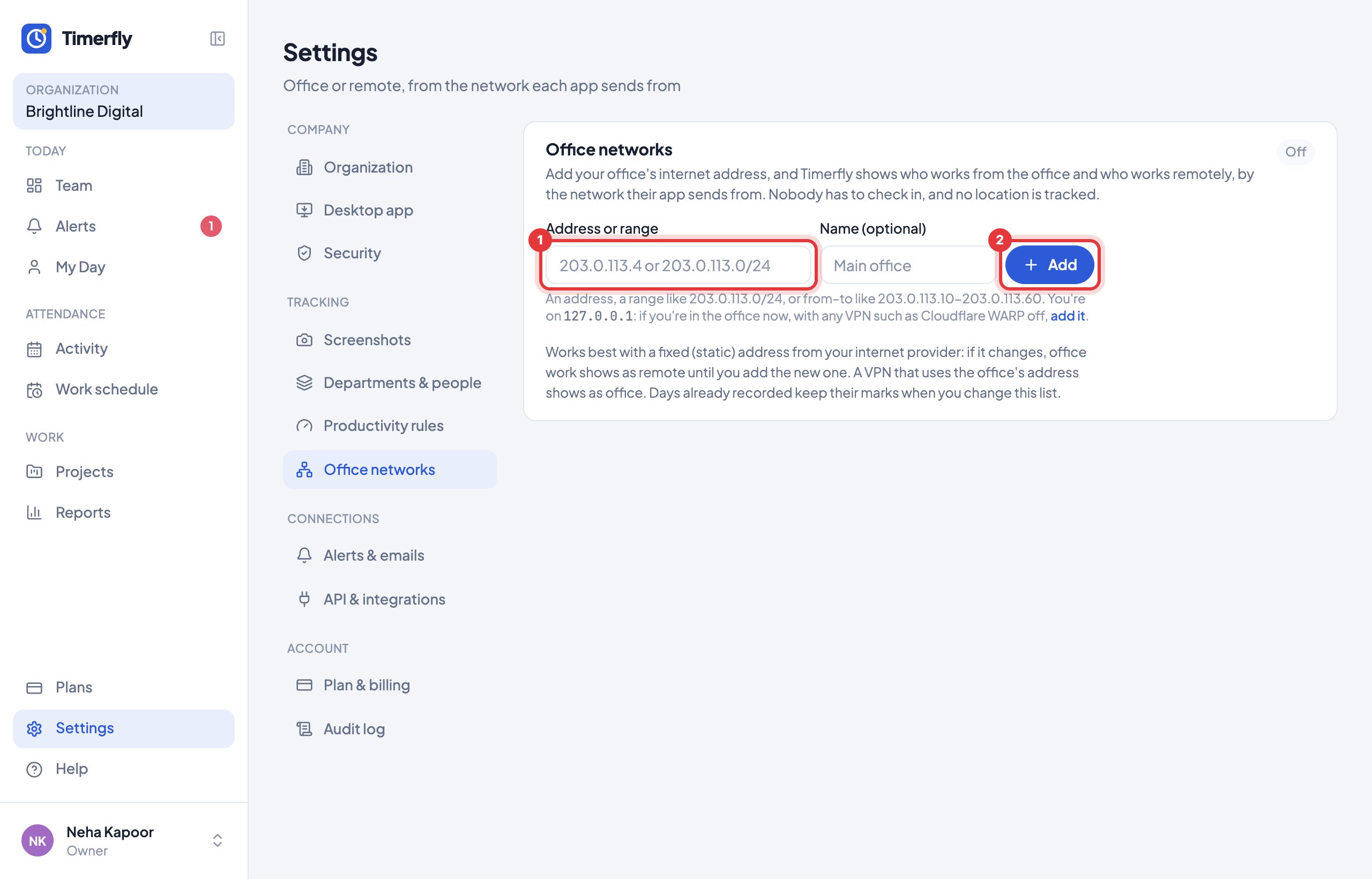
You see Office or Remote next to each person on Team, on each day, and as office and remote days in Reports and the Excel.
It works best with a fixed (static) address from your internet provider.
Still stuck? We’re happy to help.
Ask usMore on tracking and privacy
- What does Timerfly record?
- Are window titles recorded?
- Are screenshots taken?
- Where do I see screenshots? Can I delete one?
- Can screenshots be blurred?
- Can one department or one person have different screenshot or idle settings?
- Can we allow sign-in only from the office?
- How long is our data kept?
- Do I need to tell my employees?
New to Timerfly?
Try every feature free for 14 days.